Increase Youtube Video Views
Click here for the detailed steps.
~
Showing posts with label Web. Show all posts
Showing posts with label Web. Show all posts
Thursday, February 10, 2011

Friday, February 4, 2011
Hacking Webleague Sites
Hacking Webleague Sites
Google for "Powered By Webleague"
Choose a site & select Your Taget Site In A New Page.
For Example You Got This Site
http://www.cyberpranay.de/WebLeague
Now Add "install.php" at the End Of The URL And Hit Enter.
You Get A New Page
http://www.cyberpranay.de/WebLeague/install.php
Enter A New Admin And Password And Submit
Then Type "/Admin/index.php" In The End And Hit Enter
http://www.cyberpranay.de/WebLeague/Admin/index.php
Login With The Admin Account You Created
Go To Settings And Make The Changes.
~
Google for "Powered By Webleague"
Choose a site & select Your Taget Site In A New Page.
For Example You Got This Site
http://www.cyberpranay.de/WebLeague
Now Add "install.php" at the End Of The URL And Hit Enter.
You Get A New Page
http://www.cyberpranay.de/WebLeague/install.php
Enter A New Admin And Password And Submit
Then Type "/Admin/index.php" In The End And Hit Enter
http://www.cyberpranay.de/WebLeague/Admin/index.php
Login With The Admin Account You Created
Go To Settings And Make The Changes.
~
Monday, January 24, 2011
Saturday, January 8, 2011
New Facebook Scams (Updated)
New Facebook Scams
Facebook users should be careful about survey scams that are quickly spreading across the social network. Many Facebook users are struggling to clean up their accounts once they’ve been tricked into allowing a third party application to post messages from their profile.
Typical scams include messages that read:
“OMG this girl KILLED herself after her dad posted on her wall: LINK”
“Amazing how such a harmless prank could cause something so bad!: LINK”
“OMG OMG OMG…I cant believe this actually works! Now you really can see who viewed your profile! LINK”


However, by clicking on the link and giving a third-party Facebook application access to their profile, users are helping the scammers to spread the application across their network of friends.
As Per the innocent peoples are using internet, hackers are always interested to do the social engineering on them. Be careful with the email shown below listed come to your Email ID.
Whenever You See All Below Shown Title In Your Email Id Delete Mail Immediately.
12 Most Dangerous All Time Online Scams :-
1. “Help! I’ve been robbed” scam :-
2. Holiday job offers
3. Smishing
4. Hotel and Airport Wi-Fi
5. Suspicious holiday rentals
6. Low price traps
7. Charity scams
8. Grinch-like greetings
9. iPad offer scams
10. Recession scams continue
11. Dangerous holiday downloads
~
Facebook users should be careful about survey scams that are quickly spreading across the social network. Many Facebook users are struggling to clean up their accounts once they’ve been tricked into allowing a third party application to post messages from their profile.
Typical scams include messages that read:
“OMG this girl KILLED herself after her dad posted on her wall: LINK”
“Amazing how such a harmless prank could cause something so bad!: LINK”
“OMG OMG OMG…I cant believe this actually works! Now you really can see who viewed your profile! LINK”


However, by clicking on the link and giving a third-party Facebook application access to their profile, users are helping the scammers to spread the application across their network of friends.
As Per the innocent peoples are using internet, hackers are always interested to do the social engineering on them. Be careful with the email shown below listed come to your Email ID.
Whenever You See All Below Shown Title In Your Email Id Delete Mail Immediately.
12 Most Dangerous All Time Online Scams :-
1. “Help! I’ve been robbed” scam :-
2. Holiday job offers
3. Smishing
4. Hotel and Airport Wi-Fi
5. Suspicious holiday rentals
6. Low price traps
7. Charity scams
8. Grinch-like greetings
9. iPad offer scams
10. Recession scams continue
11. Dangerous holiday downloads
~
Thursday, January 6, 2011
Invisible in Facebook
Be Invisible in Facebook
You may want to chat with someone without knowing others.
Follow the steps for being Invisible to part of your friends, while Visible to Others.
Step 1: Bottom right of the FB window, there is chat option, click on it.
Step 2: Now click on friends list.
Step 3: Create the list named, say [DearOnes].
Step 4: Now see in chat window there will be a small [edit] written in front of [DearOnes List]. click on it.
Step 5: Then add your friends {Whom you want to do chat in private}
Step 6: Refresh your page.
Step 7: See there will be [Other Friends list] and many other if you have created more before, in the chat box.
Step 8: Now see that is there any [green color oval] after every friend list, now u just have to click on that oval to make that friends list offline and you have to do this for every friends list you created, this will turn you offline to them, and the oval now be showing gray color.
~
You may want to chat with someone without knowing others.
Follow the steps for being Invisible to part of your friends, while Visible to Others.
Step 1: Bottom right of the FB window, there is chat option, click on it.
Step 2: Now click on friends list.
Step 3: Create the list named, say [DearOnes].
Step 4: Now see in chat window there will be a small [edit] written in front of [DearOnes List]. click on it.
Step 5: Then add your friends {Whom you want to do chat in private}
Step 6: Refresh your page.
Step 7: See there will be [Other Friends list] and many other if you have created more before, in the chat box.
Step 8: Now see that is there any [green color oval] after every friend list, now u just have to click on that oval to make that friends list offline and you have to do this for every friends list you created, this will turn you offline to them, and the oval now be showing gray color.
~
Monday, December 27, 2010
Grab Friends Facebook Photo Albums
Download Friends Facebook Photo Albums
Download any of your Facebook photo albums with ease, all you need is Fotobounce – it’s a free Windows-only utility that would help you manage photos in your Facebook and Flickr accounts right from the desktop.

You can download old photos, upload new ones to the web or simply view your existing photo albums as a slideshow without downloading them locally.
Fotobounce also includes built-in face recognition (similar to what you have in Google’s Picasa Albums) so you can quickly tag photos on the desktop and these people tags will be preserved even when the photos are uploaded on to Facebook.
This utility is useful if you want to migrate photos from one account to another.
~
Download any of your Facebook photo albums with ease, all you need is Fotobounce – it’s a free Windows-only utility that would help you manage photos in your Facebook and Flickr accounts right from the desktop.

You can download old photos, upload new ones to the web or simply view your existing photo albums as a slideshow without downloading them locally.
Fotobounce also includes built-in face recognition (similar to what you have in Google’s Picasa Albums) so you can quickly tag photos on the desktop and these people tags will be preserved even when the photos are uploaded on to Facebook.
This utility is useful if you want to migrate photos from one account to another.
~
Facebook Phonebook
Facebook Phonebook
Facebook provides a neatly formatted phonebook with contact numbers all your friends who have shared them on Facebook.
Login into Facebook, visit this page and you’ll get a neatly arranged list of telephone numbers of all your Facebook friend along with their names and profile pictures.
Take a print & have those phone numbers ready whenever you need them.
~
Facebook provides a neatly formatted phonebook with contact numbers all your friends who have shared them on Facebook.
Login into Facebook, visit this page and you’ll get a neatly arranged list of telephone numbers of all your Facebook friend along with their names and profile pictures.
Take a print & have those phone numbers ready whenever you need them.
~
Friday, December 24, 2010
Download your Data from Facebook
Download your Data from Facebook
Facebook has added a new download button in your account that will help you move all your data out of Facebook as a zip file. It will have all your photos, videos, messages, and everything else that you may have ever uploaded to Facebook.
The process is extremely simple. Just go to your Account Settings page and click the “Download Your Information” link.
You will receive a mail in your Inbox, follow the link. (You need to login again through the link given for security reasons).
Note: Here "Inbox" refers to the E-mail through which Facebook account has been linked with.
~
Facebook has added a new download button in your account that will help you move all your data out of Facebook as a zip file. It will have all your photos, videos, messages, and everything else that you may have ever uploaded to Facebook.
The process is extremely simple. Just go to your Account Settings page and click the “Download Your Information” link.
You will receive a mail in your Inbox, follow the link. (You need to login again through the link given for security reasons).
Note: Here "Inbox" refers to the E-mail through which Facebook account has been linked with.
~
Friday, December 10, 2010
Export Email Addresses of all your Facebook Friends
Export Email Addresses of all your Facebook Friends into Harddisk
The most important principle for Facebook is that every person owns and controls her information. Each person owns her friends list, but not her friends’ information. A person has no more right to mass export all of her friends’ private email addresses than she does to mass export all of her friends’ private photo albums. - Facebook
There’s however a simple (and perfectly legal) workaround that can help you easily download all your friends email addresses from Facebook’s walled site.
Click here for the complete steps to Export Email Addresses of all your Facebook Friends.
~
The most important principle for Facebook is that every person owns and controls her information. Each person owns her friends list, but not her friends’ information. A person has no more right to mass export all of her friends’ private email addresses than she does to mass export all of her friends’ private photo albums. - Facebook
There’s however a simple (and perfectly legal) workaround that can help you easily download all your friends email addresses from Facebook’s walled site.
Click here for the complete steps to Export Email Addresses of all your Facebook Friends.
~
Monday, December 6, 2010
Friends Secretly Delete You As a Contact
How to Know When Facebook Friends Secretly Delete You As a Contact
“A and B are now friends on Facebook” – That’s the message displayed in your Facebook profile each time you add a new friend on Facebook or someone else confirms your pending request.
But the reverse is not always true – you will never know when existing friends remove you from their Facebook friends list. The count of your friends will decrease but Facebook won’t reveal the name of the person who just unfriended you.
You can however play detective using some applications. These 'app's will let you know when friends quietly remove as a connection on Facebook.
Unfriend Directory
Unfriend Monitor
Unfriender
Note: The only downside is that these may works only with friends that you have added after installing the Facebook application.
Disclaimer: Some 'app's may be vulnerable.
~
“A and B are now friends on Facebook” – That’s the message displayed in your Facebook profile each time you add a new friend on Facebook or someone else confirms your pending request.
But the reverse is not always true – you will never know when existing friends remove you from their Facebook friends list. The count of your friends will decrease but Facebook won’t reveal the name of the person who just unfriended you.
You can however play detective using some applications. These 'app's will let you know when friends quietly remove as a connection on Facebook.
Unfriend Directory
Unfriend Monitor
Note: The only downside is that these may works only with friends that you have added after installing the Facebook application.
Disclaimer: Some 'app's may be vulnerable.
~
Saturday, November 20, 2010
ISP is Limiting your Download Speed ?
ISP is Limiting your Download Speed ?
Sometimes speed seems to go down while you are watching videos on YouTube or are trying to download files through a torrent client, even though you have a fairly good Internet connection at home and regular websites load pretty quickly in your browser.
Click here for the complete topic.
~
Sometimes speed seems to go down while you are watching videos on YouTube or are trying to download files through a torrent client, even though you have a fairly good Internet connection at home and regular websites load pretty quickly in your browser.
Click here for the complete topic.
~
Sunday, October 31, 2010
How Big Really
How Big Really
It often becomes a bit easy for us to visualize the size of an area if it is shown relative to something that we are already aware of.
Based on this idea, BBC has launched a new site called Dimensions where you can visualize the scale of important historical places and events by overlaying them on a map of a location that you are already familiar with.

For instance, you can set your city as the starting point for the Great Wall of China to understand how massive it is. Or if you wish to know how much distance did the astronauts walk when they first landed on the moon, simply overlay that area to some familiar neighborhood.
There’s a map of Tora Bora caves in Afghanistan where Laden was thought to be hiding sometime. Once you see that area relative to your own location, you suddenly realize how big it is.
Note: Dimensions is a prototype built by BERG for the BBC. We make no guarantee as to its accuracy, reliability or performance.
~
It often becomes a bit easy for us to visualize the size of an area if it is shown relative to something that we are already aware of.
Based on this idea, BBC has launched a new site called Dimensions where you can visualize the scale of important historical places and events by overlaying them on a map of a location that you are already familiar with.

For instance, you can set your city as the starting point for the Great Wall of China to understand how massive it is. Or if you wish to know how much distance did the astronauts walk when they first landed on the moon, simply overlay that area to some familiar neighborhood.
There’s a map of Tora Bora caves in Afghanistan where Laden was thought to be hiding sometime. Once you see that area relative to your own location, you suddenly realize how big it is.
Note: Dimensions is a prototype built by BERG for the BBC. We make no guarantee as to its accuracy, reliability or performance.
~
Sunday, October 24, 2010
Is it Raining Now in Moscow ?
Want to know if it’s raining in any particular city of the world?

Just go to your browser’s address bar and type IsItRaining.in/{cityname}. For instance, a URL like isitraining.in/moscow will show you the current conditions of Moscow in just one word – Yes or No.
If there are two or more cities with the same name, you can add the name of the State or Country after the name of the city to point to the right one.
Note: The tool is internally powered by Yahoo! Weather and caches results for 30 minutes so it may not give the real-time conditions always.
~

Just go to your browser’s address bar and type IsItRaining.in/{cityname}. For instance, a URL like isitraining.in/moscow will show you the current conditions of Moscow in just one word – Yes or No.
If there are two or more cities with the same name, you can add the name of the State or Country after the name of the city to point to the right one.
Note: The tool is internally powered by Yahoo! Weather and caches results for 30 minutes so it may not give the real-time conditions always.
~
Sunday, October 10, 2010
How Does a Color-Blind Person See Your Site ?
Try Vischeck on a Webpage
With around 5-8% of males diagnosed colorblind, it is increasingly important for web designers to see how colorblind users on the Internet perceive color combinations.
If you are interested in designing a more accessible website or are curious to experience websites from the eyes of a color blind, a new service called Vischeck will help.
Vischeck will help you see web pages as they appear to people who may be color blind.
~
With around 5-8% of males diagnosed colorblind, it is increasingly important for web designers to see how colorblind users on the Internet perceive color combinations.
If you are interested in designing a more accessible website or are curious to experience websites from the eyes of a color blind, a new service called Vischeck will help.
Vischeck will help you see web pages as they appear to people who may be color blind.
~
Monday, October 4, 2010
Facebook Pages - Warning
Facebook Pages - Warning
There’s a new kind of ‘scam’ on Facebook that won’t do you any harm but it is likely to embarrass you in public. I have lately seen some of my tech-savvy friends on Facebook fall for such scams and you should be careful as well.

Working of Scam: You land on a unsuspecting Facebook page and there’s a pop-up saying that you need to confirm that you are an adult in order to view the underlying content. You click confirm and the dialog disappears.
Actual Working: The problem is that the ‘pop-up’ you just clicked was not actually a pop-up but some sort of a hidden script that executes itself as soon as you hit the ‘Confirm’ button.
The script, in most cases, will automatically post a link on your Facebook wall thus broadcasting to the world that you just tried visiting an ‘adult’ site. This will almost create a viral effect because now your other friends will be eager to see that page and some of them may fall in the trap as well.
~
There’s a new kind of ‘scam’ on Facebook that won’t do you any harm but it is likely to embarrass you in public. I have lately seen some of my tech-savvy friends on Facebook fall for such scams and you should be careful as well.
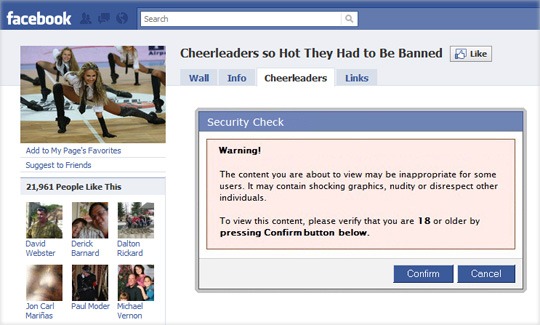
Working of Scam: You land on a unsuspecting Facebook page and there’s a pop-up saying that you need to confirm that you are an adult in order to view the underlying content. You click confirm and the dialog disappears.
Actual Working: The problem is that the ‘pop-up’ you just clicked was not actually a pop-up but some sort of a hidden script that executes itself as soon as you hit the ‘Confirm’ button.
The script, in most cases, will automatically post a link on your Facebook wall thus broadcasting to the world that you just tried visiting an ‘adult’ site. This will almost create a viral effect because now your other friends will be eager to see that page and some of them may fall in the trap as well.
~
Tuesday, September 14, 2010
Don’t Add Your Gmail Inbox to Public Bookmarks
Don’t Add Your Gmail Inbox to Public Bookmarks
If you have added the web address (URL) of your Gmail inbox to your browser bookmarks, make sure that the bookmarks are not getting synched with a public service like Delicious or Google Bookmarks.
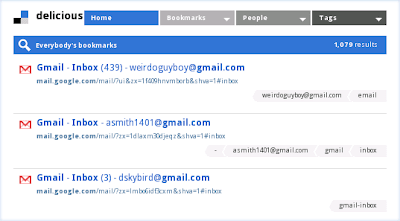
That’s because when you bookmark your Inbox or any other folder in Gmail, your email address is added to the title of the bookmark. When this bookmark becomes public, your email address automatically gets exposed to spam bots.
This may sound like an obvious thing but just search for “mail.google.com” or “Gmail Inbox” on Delicous, Xmarks or even Google Bookmarks and you’ll tons of “working” email addresses in the title of the bookmarks.
~
If you have added the web address (URL) of your Gmail inbox to your browser bookmarks, make sure that the bookmarks are not getting synched with a public service like Delicious or Google Bookmarks.

That’s because when you bookmark your Inbox or any other folder in Gmail, your email address is added to the title of the bookmark. When this bookmark becomes public, your email address automatically gets exposed to spam bots.
This may sound like an obvious thing but just search for “mail.google.com” or “Gmail Inbox” on Delicous, Xmarks or even Google Bookmarks and you’ll tons of “working” email addresses in the title of the bookmarks.
~
Sunday, September 12, 2010
Google Realtime

Google Realtime Homepage
Google Realtime Search was only a section of Google's search sidebar that allows you to restrict the results to Twitter, Facebook, Google Buzz and other sites where you can post public updates. Now it's a full-fledged service that has a homepage, a logo and a name.

Watch "How to use Realtime Search" Video here.
Even if Google Realtime's homepage is at google.com/realtime, you'll miss two important new features if you don't go to this special URL: filtering results by location and showing the context of a message using a conversation view.
Restrict search results to a location to find out what people from a certain place think about a topic. "You can use geographic refinements to find updates and news near you, or in a region you specify. So if you're traveling to 'Moscow' this summer, you can check out tweets from 'Muscovites' to get ideas for activities happening right where you are," suggests Google.

If one of the search results is part of a conversation, Google shows a link to the full conversation. "Often a single tweet sparks a larger conversation of re-tweets and other replies, but to put it together you have to click through a bunch of links and figure it out yourself. With the new full conversation feature, you can browse the entire conversation in a single glance."

Google also added a new feature to Google Alerts: updates, which is another name for realtime results. It's not a good idea to choose the "as-it-happens" option because you'll receive a lot of email alerts.
~
Friday, September 10, 2010
Undo Send
Undo “Send” in Gmail
Note: The feature is hidden from most users who don’t know where to look, so here’s a quick guide to avoiding social and workplace faux pas with the click of a button. Be aware that the feature is part of Gmail Labs, though. That means it’s still in testing and it might not always work as intended - CosmoCyber
Since the Undo Send feature is part of Gmail Labs, you’ll have to navigate to the Gmail Labs page to activate it. Load up Gmail (Gmail) and look in the top-right corner of the page. Between your e-mail address and Settings you’ll see the green Labs icon.
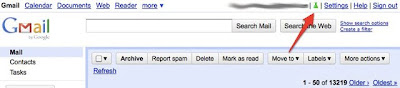
Find "Undo Send" among the list. (Picture Below)
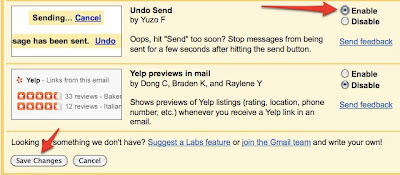
Customize Undo Send’s Duration
By default, Gmail gives you a 10-second window of time in which you may undo a sent e-mail. You can change that to five, 20 or 30 seconds by going to Settings.

How it Works ?
Write and Send Your E-mail
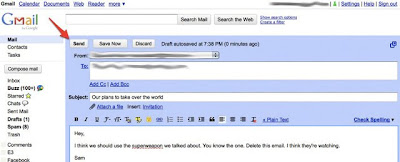
Now you have either five, 10, 20 or 30 seconds to undo your sent e-mail, depending on what you selected under Settings.
As soon as you hit Send, a subtle line of text will appear above your Inbox saying “Your message has been sent.” It will be accompanied by a few extra options. Among them is “Undo.” Click that within the allotted time and your faux pas will be prevented.
Click the “Undo” Button After You Send

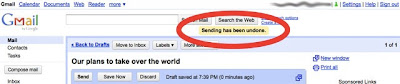
“Sending Has Been Undone”
You’ll immediately be taken back to the e-mail composition page, and your e-mail will be in draft form, unsent and ready for further editing.
~
Note: The feature is hidden from most users who don’t know where to look, so here’s a quick guide to avoiding social and workplace faux pas with the click of a button. Be aware that the feature is part of Gmail Labs, though. That means it’s still in testing and it might not always work as intended - CosmoCyber
Since the Undo Send feature is part of Gmail Labs, you’ll have to navigate to the Gmail Labs page to activate it. Load up Gmail (Gmail) and look in the top-right corner of the page. Between your e-mail address and Settings you’ll see the green Labs icon.

Find "Undo Send" among the list. (Picture Below)

Customize Undo Send’s Duration
By default, Gmail gives you a 10-second window of time in which you may undo a sent e-mail. You can change that to five, 20 or 30 seconds by going to Settings.

How it Works ?
Write and Send Your E-mail

Now you have either five, 10, 20 or 30 seconds to undo your sent e-mail, depending on what you selected under Settings.
As soon as you hit Send, a subtle line of text will appear above your Inbox saying “Your message has been sent.” It will be accompanied by a few extra options. Among them is “Undo.” Click that within the allotted time and your faux pas will be prevented.
Click the “Undo” Button After You Send

“Sending Has Been Undone”
You’ll immediately be taken back to the e-mail composition page, and your e-mail will be in draft form, unsent and ready for further editing.

~
Wednesday, September 8, 2010
Priority Inbox
Priority Inbox
Gmail has always had an excellent spam filter that keeps junk messages out of your Inbox. Google added a reverse feature that is quite unique to Gmail – it’s called the Priority Inbox.
Priority Inbox is like having a personal secretary whose job is to sort your incoming mail based on importance. She knows about your friends, your colleagues and other people with whom you interact regularly and can therefore categorize your email accordingly.
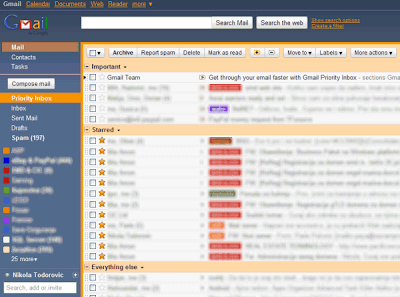
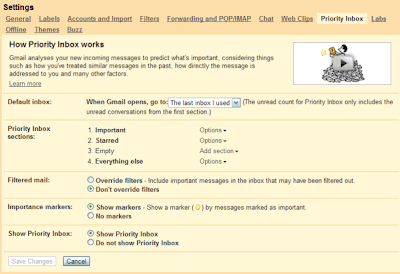
Priority Inbox is something similar – it’s an intelligent, self-learning filter that automatically puts your most important email messages at the top of your Inbox so that you may deal with them first. The feature is now live for both Gmail and Google Apps email accounts.
Priority Inbox splits your inbox into three sections: Important and unread, Starred, and Everything else. Messages are automatically categorized as they arrive in your inbox. Gmail uses a variety of signals to predict which messages are important, including the people you email most and which messages you open and reply to. Google takes into account implicit signals like: the messages from people you frequently email are important, if a message includes words frequently used in other messages you usually read then it's probably important, the messages you star are probably more important than the messages you archive without opening.
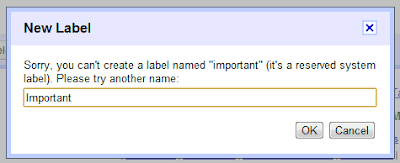
Note: Gmail uses the "important" label to classify messages, so that's the reason why you can't create a label named "important".
~
Gmail has always had an excellent spam filter that keeps junk messages out of your Inbox. Google added a reverse feature that is quite unique to Gmail – it’s called the Priority Inbox.
Priority Inbox is like having a personal secretary whose job is to sort your incoming mail based on importance. She knows about your friends, your colleagues and other people with whom you interact regularly and can therefore categorize your email accordingly.


Priority Inbox is something similar – it’s an intelligent, self-learning filter that automatically puts your most important email messages at the top of your Inbox so that you may deal with them first. The feature is now live for both Gmail and Google Apps email accounts.
Priority Inbox splits your inbox into three sections: Important and unread, Starred, and Everything else. Messages are automatically categorized as they arrive in your inbox. Gmail uses a variety of signals to predict which messages are important, including the people you email most and which messages you open and reply to. Google takes into account implicit signals like: the messages from people you frequently email are important, if a message includes words frequently used in other messages you usually read then it's probably important, the messages you star are probably more important than the messages you archive without opening.
Note: Gmail uses the "important" label to classify messages, so that's the reason why you can't create a label named "important".

~
Thursday, July 22, 2010
Subscribe to:
Posts (Atom)


