ISP is Limiting your Download Speed ?
Sometimes speed seems to go down while you are watching videos on YouTube or are trying to download files through a torrent client, even though you have a fairly good Internet connection at home and regular websites load pretty quickly in your browser.
Click here for the complete topic.
~
Showing posts with label Internet. Show all posts
Showing posts with label Internet. Show all posts
Saturday, November 20, 2010

Thursday, March 25, 2010
Hacking Yahoo Messenger & Getting IP
Hacking Yahoo Messenger & Getting IP
While you are chatting through yahoo messenger, Yahoo will hide the IP addresses of all the computers that are connected through the yahoo messenger application to the chat room.So it is not possible to directly find out the IP of the person you want to hack.
Then how to get the IP address?
Yes it is still possible to hack the IP address during the Yahoo messenger chat.
While you are chatting via yahoo messenger the communication between you and the person you want to hack, takes place indirectly via Yahoo server and not directly.It is not possible to hack Yahoo messenger directly to get the IP address. So to hack his IP, you must establish a direct communication with him/her.
So,how to do this ?
It’s easy.
Just start chatting with the person (Whom you want to Hack) via Yahoo messenger. During the process of chatting send him a big file. Now the file transfer takes place directly between your computer and the victim’s computer(via yahoo messenger application).
So now, you are ready to go. Here’s the step-by-step process to hack Yahoo messenger and get the IP address of the person.
Type netstat -n in Command Prompt.
The pic given below shows netstat results of my computer. {When I was not chatting}
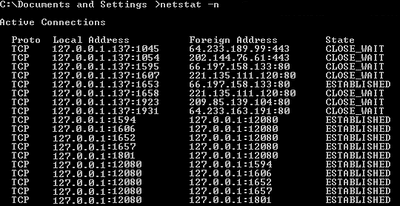
Here local address is your own IP and the foreign address is the IP address of the recipient with whom you are connected via yahoo messenger (There may be multiple recipients and hence multiple foreign addresses).
Now send him the file.
Check the output by typing the command netstat -n
Assume the output is something like this.
TCP 127.0.0.10:5101 124.55.23.11:1246 ESTABLISHED
Here 124.55.23.11 is the IP address of the person with whom you are chatting and 1246 is the port number where connection is established.That’s It! You have now hacked Yahoo messenger to get his IP address.
Once you hack Yahoo messenger and get his IP address you can use any of the Remote Administration tools or perform NETBIOS HACKING.
NOTE: Some times there are chances where in the file transfer gets encrypted (takes place via yahoo server itself).So in this case the above hack may fail to work.
~
While you are chatting through yahoo messenger, Yahoo will hide the IP addresses of all the computers that are connected through the yahoo messenger application to the chat room.So it is not possible to directly find out the IP of the person you want to hack.
Then how to get the IP address?
Yes it is still possible to hack the IP address during the Yahoo messenger chat.
While you are chatting via yahoo messenger the communication between you and the person you want to hack, takes place indirectly via Yahoo server and not directly.It is not possible to hack Yahoo messenger directly to get the IP address. So to hack his IP, you must establish a direct communication with him/her.
So,how to do this ?
It’s easy.
Just start chatting with the person (Whom you want to Hack) via Yahoo messenger. During the process of chatting send him a big file. Now the file transfer takes place directly between your computer and the victim’s computer(via yahoo messenger application).
So now, you are ready to go. Here’s the step-by-step process to hack Yahoo messenger and get the IP address of the person.
Type netstat -n in Command Prompt.
The pic given below shows netstat results of my computer. {When I was not chatting}

Here local address is your own IP and the foreign address is the IP address of the recipient with whom you are connected via yahoo messenger (There may be multiple recipients and hence multiple foreign addresses).
Now send him the file.
Check the output by typing the command netstat -n
Assume the output is something like this.
TCP 127.0.0.10:5101 124.55.23.11:1246 ESTABLISHED
Here 124.55.23.11 is the IP address of the person with whom you are chatting and 1246 is the port number where connection is established.That’s It! You have now hacked Yahoo messenger to get his IP address.
Once you hack Yahoo messenger and get his IP address you can use any of the Remote Administration tools or perform NETBIOS HACKING.
NOTE: Some times there are chances where in the file transfer gets encrypted (takes place via yahoo server itself).So in this case the above hack may fail to work.
~
Friday, March 12, 2010
Is Your PC Connecting To Websites Without Your Knowledge
Is Your PC Connecting To Websites Without Your Knowledge
If you are worried that some programs on your PC are secretly making connections to websites in the background, here's a quick tip that uses a simple DOS command to detect and prevent such suspicious activity:
1. Type cmd in your Windows Run box.
2. Type netstat -b 5 > activity.txt and press Enter. After 2 minutes, press Ctrl+C.
3. Type activity.txt on the command line to open the log file in Notepad.
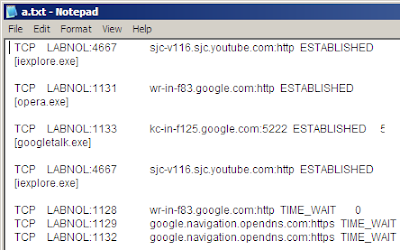
The file activity.txt will have a log of all process that made a connection to the Internet in the last two minutes. It will also show which process connected to which website in this time. And not just the web browsers (like iexplore.exe or opera.exe), the log will also show your IM clients, download managers, email programs or any software that requires a net connection.
Scroll though the activity.txt file and look for any process names or website addresses that you are not aware of.
If you track one , go to the Task Manager (or Process Explorer) to find the location of the executable file on your computer and eliminate the threat.
~
If you are worried that some programs on your PC are secretly making connections to websites in the background, here's a quick tip that uses a simple DOS command to detect and prevent such suspicious activity:
1. Type cmd in your Windows Run box.
2. Type netstat -b 5 > activity.txt and press Enter. After 2 minutes, press Ctrl+C.
3. Type activity.txt on the command line to open the log file in Notepad.

The file activity.txt will have a log of all process that made a connection to the Internet in the last two minutes. It will also show which process connected to which website in this time. And not just the web browsers (like iexplore.exe or opera.exe), the log will also show your IM clients, download managers, email programs or any software that requires a net connection.
Scroll though the activity.txt file and look for any process names or website addresses that you are not aware of.
If you track one , go to the Task Manager (or Process Explorer) to find the location of the executable file on your computer and eliminate the threat.
~
Tuesday, January 26, 2010
Websites and Words That Are Blocked in China
Websites and Words That Are Blocked in China

There are generally two kinds of internet censorship in China – they either completely block a website from users or they instruct local search engines to modify search results for certain keywords.
For instance, sites like IMDB and BBC are inaccessible from within China and some of them may not even appear in the search results of local search engines like Baidu or Sohu. The next form of censorship is keyword based. If you search for a censored keyword (say “Human Rights”) in a Chinese search engine, you’ll see few or no results.
~

There are generally two kinds of internet censorship in China – they either completely block a website from users or they instruct local search engines to modify search results for certain keywords.
For instance, sites like IMDB and BBC are inaccessible from within China and some of them may not even appear in the search results of local search engines like Baidu or Sohu. The next form of censorship is keyword based. If you search for a censored keyword (say “Human Rights”) in a Chinese search engine, you’ll see few or no results.
~
Saturday, December 12, 2009
Type Web Addresses Quickly
The Best Keyboard Shortcut in Firefox – Type Web Addresses Quickly
If you haven’t upgrade to Firefox 3 yet, please do so. The new version is far more responsive and stable that its predecessors.
Another reason for loving Firefox 3 is the way it auto-completes web URLs – very intelligent and something you’ll miss in IE. Update: Firefox 2 users share that this works in the previous version as well.
To get started, press Alt+D or Ctrl+L to move the cursor to your Firefox browser address bar and then try some of these combinations:
To open Google Maps website, type "google/maps" in the Firefox address bar and press Ctrl+Enter.
Firefox will automatically surround the word(s) that are before the first slash with www. and .com. IE 7 and previous version of Firefox can’t do this.
And this URL auto-complete works even if you have several subdirectories in the URL. For instance, your Google Apps sign-in page will open correctly if you type "google/a/mysite.com" and press Ctrl+Enter.
If you want to open a .org site, you need to use Ctrl+Shift+Enter. Typing yahoo/forums followed by Ctrl+Shift+Enter would therefore open our support website at www.yahoo.org/forums.
And for .net websites, the shortcut key is Shift+Enter. So you can view the most popular PowerPoint presentations on Slideshare by typing slideshare/popular followed by Shift+Enter.
http://www.youtube.com/watch?v=-ZmFs0ws9CU&feature=player_embedded
For Geeks: If you like Firefox to add a different suffix other than .com, open your Firefox settings page at about:config and change the value of key browser.fixup.alternate.suffix to something else like .org, .net, etc.
Download the latest version of Firefox here.
~
If you haven’t upgrade to Firefox 3 yet, please do so. The new version is far more responsive and stable that its predecessors.
Another reason for loving Firefox 3 is the way it auto-completes web URLs – very intelligent and something you’ll miss in IE. Update: Firefox 2 users share that this works in the previous version as well.
To get started, press Alt+D or Ctrl+L to move the cursor to your Firefox browser address bar and then try some of these combinations:
To open Google Maps website, type "google/maps" in the Firefox address bar and press Ctrl+Enter.
Firefox will automatically surround the word(s) that are before the first slash with www. and .com. IE 7 and previous version of Firefox can’t do this.
And this URL auto-complete works even if you have several subdirectories in the URL. For instance, your Google Apps sign-in page will open correctly if you type "google/a/mysite.com" and press Ctrl+Enter.
If you want to open a .org site, you need to use Ctrl+Shift+Enter. Typing yahoo/forums followed by Ctrl+Shift+Enter would therefore open our support website at www.yahoo.org/forums.
And for .net websites, the shortcut key is Shift+Enter. So you can view the most popular PowerPoint presentations on Slideshare by typing slideshare/popular followed by Shift+Enter.
http://www.youtube.com/watch?v=-ZmFs0ws9CU&feature=player_embedded
For Geeks: If you like Firefox to add a different suffix other than .com, open your Firefox settings page at about:config and change the value of key browser.fixup.alternate.suffix to something else like .org, .net, etc.
Download the latest version of Firefox here.
~
Monday, December 7, 2009
Sunday, December 6, 2009
[W] Make IE8 Run Faster
Make IE8 Run Faster
Microsoft has recently released the new browser Internet Explorer version 8 and IE 8 has won the hearts of many people with its new features. I must admit I also have been using Firefox before that primarily because of all the features were better in Firefox along with its addons.
Internet Explorer 8 has good list of features as mentioned earlier and also has more speed than its earlier version IE7. IE8 is facing stiff competition with other browsers like Mozilla Firefox.But Microsoft has taken tremendous amount of effort to bring the standards in IE8 as they have been trying with Windows 7 also.
IE8 is indeed faster than Firefox but its too hard to notice the difference. So the browsing speed of IE8 has undergone some major changes and yet with a simple changes you can increase the speed even better.
So, to increase your IE8 speed much more:-
1. Go to Start > Run
2. Open the command prompt with admin rights (type cmd in Run).
Type the following command
regsvr32 actxprxy.dll
The following message will come up:
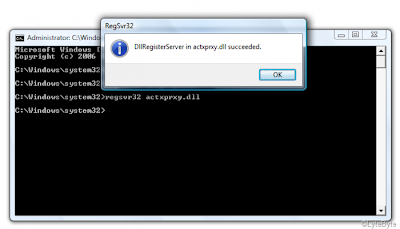
Now just restart your system and see the difference..
Microsoft has recently released the new browser Internet Explorer version 8 and IE 8 has won the hearts of many people with its new features. I must admit I also have been using Firefox before that primarily because of all the features were better in Firefox along with its addons.
Internet Explorer 8 has good list of features as mentioned earlier and also has more speed than its earlier version IE7. IE8 is facing stiff competition with other browsers like Mozilla Firefox.But Microsoft has taken tremendous amount of effort to bring the standards in IE8 as they have been trying with Windows 7 also.
IE8 is indeed faster than Firefox but its too hard to notice the difference. So the browsing speed of IE8 has undergone some major changes and yet with a simple changes you can increase the speed even better.
So, to increase your IE8 speed much more:-
1. Go to Start > Run
2. Open the command prompt with admin rights (type cmd in Run).
Type the following command
regsvr32 actxprxy.dll
The following message will come up:

Now just restart your system and see the difference..
Saturday, November 21, 2009
Decoding Web Error Messages
Decoding Web Error Messages
As you surf the Net, you will undoubtedly find that at times you can't access certain websites. Why, you may wonder ? Error messages attempt to explain the reason for that and other problems. Unfortunately, these cryptic messages baffle most people. I've deciphered the most common ones:
400 - Bad Request
Problem: There's something wrong with the address you entered. You may not be authorized to access the web page, or maybe it no longer exists.
Solution: Check the address carefully, especially if the address is long. Make sure that the slashes are correct (they should be forward slashes) and that all the names are properly spelled. Web addresses are case sensitive, so check that the names are capitalized in your entry as they are in the original reference to the website.
401 - Unauthorized
Problem: You can't access a website because you're not on the guest list, your password is invalid or you have entered your password incorrectly.
Solution: If you think you have authorization, try typing your password again. Remember that passwords are case sensitive.
403 - Forbidden
Problem: Essentially the same as a 401.
Solution: Try entering your password again or move on to another site.
404 - Not Found
Problem: Either the web page no longer exists on the server or it is nowhere to be found.
Solution: Check the address carefully and try entering it again. You might also see if the site has a search engine. If so, use it to hunt for the document. (It's not uncommon for pages to change their addresses when a website is redesigned.) To get to the home page of the site, delete everything after the domain name and hit the Enter or Return key. For example, if the address is:
http://www.learnthenet.com/english/html/email.htm
remove English/html/email.htm.
503 - Service unavailable
Problem: Your Internet service provider (ISP) or your Internet connection may be down.
Solution: Take a stretch, wait a few minutes and try again. If you still have no luck, call 2 your ISP.
~
As you surf the Net, you will undoubtedly find that at times you can't access certain websites. Why, you may wonder ? Error messages attempt to explain the reason for that and other problems. Unfortunately, these cryptic messages baffle most people. I've deciphered the most common ones:
400 - Bad Request
Problem: There's something wrong with the address you entered. You may not be authorized to access the web page, or maybe it no longer exists.
Solution: Check the address carefully, especially if the address is long. Make sure that the slashes are correct (they should be forward slashes) and that all the names are properly spelled. Web addresses are case sensitive, so check that the names are capitalized in your entry as they are in the original reference to the website.
401 - Unauthorized
Problem: You can't access a website because you're not on the guest list, your password is invalid or you have entered your password incorrectly.
Solution: If you think you have authorization, try typing your password again. Remember that passwords are case sensitive.
403 - Forbidden
Problem: Essentially the same as a 401.
Solution: Try entering your password again or move on to another site.
404 - Not Found
Problem: Either the web page no longer exists on the server or it is nowhere to be found.
Solution: Check the address carefully and try entering it again. You might also see if the site has a search engine. If so, use it to hunt for the document. (It's not uncommon for pages to change their addresses when a website is redesigned.) To get to the home page of the site, delete everything after the domain name and hit the Enter or Return key. For example, if the address is:
http://www.learnthenet.com/english/html/email.htm
remove English/html/email.htm.
503 - Service unavailable
Problem: Your Internet service provider (ISP) or your Internet connection may be down.
Solution: Take a stretch, wait a few minutes and try again. If you still have no luck, call 2 your ISP.
~
Monday, November 16, 2009
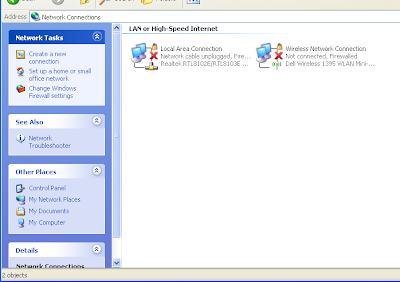
[W] "Network Connections" Icons Missing ?
"Network Connections" Icons Missing ? Network Connections Folder is Empty !
Problems:
1. You can't connect to the internet
2. Network Connections folder is empty
3. Local Area Connections (LAN) icon on taskbar missing
4. Can't connect to Wireless connections (icon also missing)
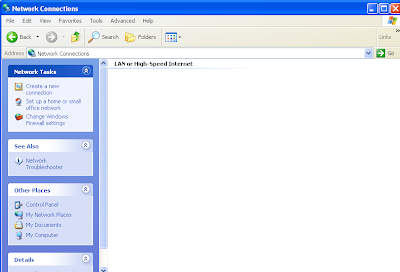
Solution:
This thing happens when one of the three files below are missing on your computer:
1. netshell.dll
2. netcfgx.dll
3. netman.dll
Download those files if needed and place them on c:\windows\system32\ folder. After copying the files you need to register them. Click Start>Run>CMD and then type the following command (hit enter after each command).
regsvr32 netshell.dll
regsvr32 netcfgx.dll
regsvr32 netman.dll
Your Network Connections will now be back to normal.
For download link of these files ask me in "comments"
~
Problems:
1. You can't connect to the internet
2. Network Connections folder is empty
3. Local Area Connections (LAN) icon on taskbar missing
4. Can't connect to Wireless connections (icon also missing)

Solution:
This thing happens when one of the three files below are missing on your computer:
1. netshell.dll
2. netcfgx.dll
3. netman.dll
Download those files if needed and place them on c:\windows\system32\ folder. After copying the files you need to register them. Click Start>Run>CMD and then type the following command (hit enter after each command).
regsvr32 netshell.dll
regsvr32 netcfgx.dll
regsvr32 netman.dll
Your Network Connections will now be back to normal.

For download link of these files ask me in "comments"
~
Thursday, October 29, 2009
Internet Explorer Bug !
Internet Explorer Bug !
If you have Problem with Internet Explorer . . . .
Ex: When you click on any site it doesn't show any page !
Solution: Open "RUN" Type "netsh winsock reset" (without the Qoutes)
When the Command Prompt Flashes, Restart the Computer.
~
If you have Problem with Internet Explorer . . . .
Ex: When you click on any site it doesn't show any page !
Solution: Open "RUN" Type "netsh winsock reset" (without the Qoutes)
When the Command Prompt Flashes, Restart the Computer.
~
Sunday, October 18, 2009
[W] "amvo.exe" Virus Removal
Amvo virus attacks Yahoo! messenger.
It consists of 3 files,
windows\system32\amvo.exe
windows\system32\amvo1.dll
windows\system32\amvo0.dll
Just delete these 3 files and the virus is gone, and donot forget to remove the startup entry for amvo.exe, using "CC Cleaner".
1. Open Task Manager
2. End Task Explorer.exe
3. Select Run from File Menu
4. Type cmd (press enter)
5. In Command Prompt Type: cd %windir%\system32
6. Type: attrib -s -h -r amvo*.*
7. Type del amvo*.*
8. Remove startup entries and virus is gone.
~
It consists of 3 files,
windows\system32\amvo.exe
windows\system32\amvo1.dll
windows\system32\amvo0.dll
Just delete these 3 files and the virus is gone, and donot forget to remove the startup entry for amvo.exe, using "CC Cleaner".
1. Open Task Manager
2. End Task Explorer.exe
3. Select Run from File Menu
4. Type cmd (press enter)
5. In Command Prompt Type: cd %windir%\system32
6. Type: attrib -s -h -r amvo*.*
7. Type del amvo*.*
8. Remove startup entries and virus is gone.
~
Saturday, October 17, 2009
Change Your 'IP' In Less Then 1 Min.
Change Your 'IP' In Less Then 1 Min.
1. Click on "Start" in the bottom left hand corner of screen
2. Click on "Run"
3. Type in "command" and hit Ok
You should now be at an MSDOS prompt screen.
4. Type "ipconfig /release" just like that, and hit "enter"
5. Type "exit" and leave the prompt
6. Right-click on "Network Places" or "My Network Places" on your desktop.
7. Click on "properties"
You should now be on a screen with something titled "Local Area Connection", or something close to that, and, if you have a network hooked up, all of your other networks.
8. Right click on "Local Area Connection" and click "Properties"
9. Double-click on the "Internet Protocol (TCP/IP)" from the list under the "General" tab
10. Click on "Use the following IP address" under the "General" tab
11. Create an IP address (It doesn't matter what it is. I just type 1 and 2 until i fill the area up).
12. Press "Tab" and it should automatically fill in the "Subnet Mask" section with default numbers.
13. Hit the "Ok" button here
14. Hit the "Ok" button again
You should now be back to the "Local Area Connection" screen.
15. Right-click back on "Local Area Connection" and go to properties again.
16. Go back to the "TCP/IP" settings
17. This time, select "Obtain an IP address automatically"
tongue.gif 18. Hit "Ok"
19. Hit "Ok" again
20. You now have a new IP address
{This only changes your dynamic IP address, not your ISP/IP address. If you plan on hacking a website with this trick be extremely careful, because if they try a little, they can trace it back}
~
1. Click on "Start" in the bottom left hand corner of screen
2. Click on "Run"
3. Type in "command" and hit Ok
You should now be at an MSDOS prompt screen.
4. Type "ipconfig /release" just like that, and hit "enter"
5. Type "exit" and leave the prompt
6. Right-click on "Network Places" or "My Network Places" on your desktop.
7. Click on "properties"
You should now be on a screen with something titled "Local Area Connection", or something close to that, and, if you have a network hooked up, all of your other networks.
8. Right click on "Local Area Connection" and click "Properties"
9. Double-click on the "Internet Protocol (TCP/IP)" from the list under the "General" tab
10. Click on "Use the following IP address" under the "General" tab
11. Create an IP address (It doesn't matter what it is. I just type 1 and 2 until i fill the area up).
12. Press "Tab" and it should automatically fill in the "Subnet Mask" section with default numbers.
13. Hit the "Ok" button here
14. Hit the "Ok" button again
You should now be back to the "Local Area Connection" screen.
15. Right-click back on "Local Area Connection" and go to properties again.
16. Go back to the "TCP/IP" settings
17. This time, select "Obtain an IP address automatically"
tongue.gif 18. Hit "Ok"
19. Hit "Ok" again
20. You now have a new IP address
{This only changes your dynamic IP address, not your ISP/IP address. If you plan on hacking a website with this trick be extremely careful, because if they try a little, they can trace it back}
~
Zaap da Screen
Zaap da Screen
1. Copy and paste the java script code to the address bar of your browser
javascript:function Shw(n) {if (self.moveBy) {for (i = 35; i > 0; i--) {for (j = n; j > 0; j--) {self.moveBy(1,i);self.moveBy(i,0);self.moveBy(0,-i);self.moveBy(-i,0); } } }} Shw(6)
2. Press enter and watch your window's "shaking it".
You can change the value of i if you wish.
Note: Itz working pretty well in IE6 & Firefox 3.5.
Not working in Opera 10.10 & Safari 4.04.
Admin: "Let me try in other browsers & other versions too . . . ."
~
1. Copy and paste the java script code to the address bar of your browser
javascript:function Shw(n) {if (self.moveBy) {for (i = 35; i > 0; i--) {for (j = n; j > 0; j--) {self.moveBy(1,i);self.moveBy(i,0);self.moveBy(0,-i);self.moveBy(-i,0); } } }} Shw(6)
2. Press enter and watch your window's "shaking it".
You can change the value of i if you wish.
Note: Itz working pretty well in IE6 & Firefox 3.5.
Not working in Opera 10.10 & Safari 4.04.
Admin: "Let me try in other browsers & other versions too . . . ."
~
Subscribe to:
Posts (Atom)


