Capture Google Earth Videos
Click here for the complete tutorial to Capture Google Earth Videos.
~
Thursday, July 22, 2010

Saturday, July 10, 2010
Someone Has Opened Your Inbox To Read Mails ?
Investigate If Someone Has Opened Your Email Inbox To Read Mails
Many surveys have revealed that a large number of companies hire staff snoopers to read and analyze outbound e-mail sent by their own employees.
If you are also worried that someone in your organization is secretly monitoring your email, here’s a simple trick to confirm that suspicion.

This is old but, best trick for nubbies- CosmoCyber
Step 1: Create a dummy web page on an external website like Webs or Weebly. Make sure you don’t share the web address (URL) of that page with anyone else in world.
Step 2: Goto sitemeter.com or statcounter.com (or any web statistics program) and generate a tracking code for the web page created in the previous step. Copy-paste the tracking code in your web page.
Both statcounter and sitemeter are free web analytics services that help you track who visited your web pages and how.
Step 3: Compose a new email message from office contain a hyperlink to the web page that you have just created. Keep the subject and the body of the email message interesting (and provocative) so that if an email snooper exists, he’ll be tempted to check that email before it leaves the office vault.
For instance, the email subject could say “Confidential Company Presentation” and the message body could say “I have upload that presentation. Please download it here.”
And that’s the trap. As soon as the snooper clicks the link in the email to visit the linking web page, that visit will be recorded by your web analytics package. You can then check the IP address and other details to confirm the location of the person who read that “secret” email message.
~
Many surveys have revealed that a large number of companies hire staff snoopers to read and analyze outbound e-mail sent by their own employees.
If you are also worried that someone in your organization is secretly monitoring your email, here’s a simple trick to confirm that suspicion.

This is old but, best trick for nubbies- CosmoCyber
Step 1: Create a dummy web page on an external website like Webs or Weebly. Make sure you don’t share the web address (URL) of that page with anyone else in world.
Step 2: Goto sitemeter.com or statcounter.com (or any web statistics program) and generate a tracking code for the web page created in the previous step. Copy-paste the tracking code in your web page.
Both statcounter and sitemeter are free web analytics services that help you track who visited your web pages and how.
Step 3: Compose a new email message from office contain a hyperlink to the web page that you have just created. Keep the subject and the body of the email message interesting (and provocative) so that if an email snooper exists, he’ll be tempted to check that email before it leaves the office vault.
For instance, the email subject could say “Confidential Company Presentation” and the message body could say “I have upload that presentation. Please download it here.”
And that’s the trap. As soon as the snooper clicks the link in the email to visit the linking web page, that visit will be recorded by your web analytics package. You can then check the IP address and other details to confirm the location of the person who read that “secret” email message.
~
Thursday, June 24, 2010
All Email Messages in Gmail Have a Permanent Web Address
All Email Messages in Gmail Have a Permanent Web Address
Do you know that it is possible to bookmark individual email messages of Gmail just like you would bookmark any regular web page.
This could be a handy alternative to search in Gmail (for accessing important emails quickly) or may be useful in situations where you don’t want to create another tag in Gmail just to remember a couple of important email messages.
You can bookmark Gmail message links in your web browser or save them as private bookmarks in delicious or even add them to your Read It Later list.
open any Gmail thread in your browser and notice the address bar as it gets updated with a unique URL. That’s the permanent address of your email message and it will stay the same as long as you don’t delete the message from your Gmail mailbox.
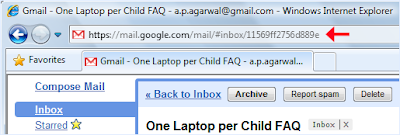
There aren’t any security issue because you can only access the email bookmarks if you are logged into your Google Apps or Gmail account.
~
Do you know that it is possible to bookmark individual email messages of Gmail just like you would bookmark any regular web page.
This could be a handy alternative to search in Gmail (for accessing important emails quickly) or may be useful in situations where you don’t want to create another tag in Gmail just to remember a couple of important email messages.
You can bookmark Gmail message links in your web browser or save them as private bookmarks in delicious or even add them to your Read It Later list.
open any Gmail thread in your browser and notice the address bar as it gets updated with a unique URL. That’s the permanent address of your email message and it will stay the same as long as you don’t delete the message from your Gmail mailbox.

There aren’t any security issue because you can only access the email bookmarks if you are logged into your Google Apps or Gmail account.
~
Tuesday, June 1, 2010
Extract Text from Images & Scanned PDF Manuals Online
Extract Text from Images & Scanned PDF Manuals Online
If you are on a budget, the built-in OCR engine of Google Search is almost a perfect option for converting scanned PDFs to text – just put all your scanned PDF images onto a public website and wait for Google spiders to convert them into editable digital text.
Obviously there are two drawbacks associated with the original idea. The PDF conversion process is not real time and second, you need access to a public web server where you can upload the PDF images so that Google bots can find them.
If you aren’t willing to wait that long and need to perform instant OCR without downloading any of the software tools, try OCR Terminal – it’s an online Optical Character Recognition service where you can upload scanned images, multi-page PDF documents or even screenshots and convert them into searchable text documents.

The conversion results, as you can noticed in the screenshot above, are pretty accurate and it also preserves the document formatting and layout. You may download the extracted text as RTF or a Word Document. The output is also available as a PDF image though I didn’t find that option very useful.
OCR Terminal is a free service but you are only allowed to convert up to 30 scanned pages in a day and allows for text extraction only from English language documents. They are developing a desktop client that will allow users to convert scanned PDFs or TIFF images and get them back as formatted Word files without the web browser
~
If you are on a budget, the built-in OCR engine of Google Search is almost a perfect option for converting scanned PDFs to text – just put all your scanned PDF images onto a public website and wait for Google spiders to convert them into editable digital text.
Obviously there are two drawbacks associated with the original idea. The PDF conversion process is not real time and second, you need access to a public web server where you can upload the PDF images so that Google bots can find them.
If you aren’t willing to wait that long and need to perform instant OCR without downloading any of the software tools, try OCR Terminal – it’s an online Optical Character Recognition service where you can upload scanned images, multi-page PDF documents or even screenshots and convert them into searchable text documents.

The conversion results, as you can noticed in the screenshot above, are pretty accurate and it also preserves the document formatting and layout. You may download the extracted text as RTF or a Word Document. The output is also available as a PDF image though I didn’t find that option very useful.
OCR Terminal is a free service but you are only allowed to convert up to 30 scanned pages in a day and allows for text extraction only from English language documents. They are developing a desktop client that will allow users to convert scanned PDFs or TIFF images and get them back as formatted Word files without the web browser
~
Monday, May 31, 2010
How ships detect and repair the damaged undersea cables
How ships detect and repair the damaged undersea cables
~
~
Friday, May 28, 2010
Who’s On Facebook Because of You?
So Who’s On Facebook Because of You?
Facebook now displays detailed invite history to all their users.

1. If you would like to know who all have joined Facebook because of you, go here.
2. If you would like to see a list of all people whom you have invited to join Facebook but they are yet to accept your invitation, go here.
3. If you like to know who in your friends circle has brought the maximum number of people to Facebook so far, go to facebook.com/impact.
The Facebook Invites history page also gives an option to send email reminders to friends who are yet to join the social site incase your previous invites went unnoticed or if they landed in the junk folder.
~
Facebook now displays detailed invite history to all their users.

1. If you would like to know who all have joined Facebook because of you, go here.
2. If you would like to see a list of all people whom you have invited to join Facebook but they are yet to accept your invitation, go here.
3. If you like to know who in your friends circle has brought the maximum number of people to Facebook so far, go to facebook.com/impact.
The Facebook Invites history page also gives an option to send email reminders to friends who are yet to join the social site incase your previous invites went unnoticed or if they landed in the junk folder.
~
Wednesday, May 26, 2010
Copy a File’s Path to the Clipboard
Copy a File’s Path to the Clipboard without any Registry Hacks !
If you ever wanted to copy the full path of any file or folder to the clipboard but without installing any third-party utilities or making any changes to your Windows registry, here’s a tip for you.

Copy the File’s Location to the Clipboard
Open Windows Explorer and navigate to the file or folder whose path you want to copy to the clipboard. Once you are there, hold the “Shift” key and right click that file or folder’s icon.
Because the Shift key is down, the contextual menu will have a new item that says “Copy as Path” – select that and the full location of the file or the folder will get saved to your clipboard from where you can paste it anywhere including the DOS window.
You can use this tip to copy a file’s location from all places including those appearing in the desktop search results.
This trick works in Windows Vista and Windows 7 but not XP.
~
If you ever wanted to copy the full path of any file or folder to the clipboard but without installing any third-party utilities or making any changes to your Windows registry, here’s a tip for you.

Copy the File’s Location to the Clipboard
Open Windows Explorer and navigate to the file or folder whose path you want to copy to the clipboard. Once you are there, hold the “Shift” key and right click that file or folder’s icon.
Because the Shift key is down, the contextual menu will have a new item that says “Copy as Path” – select that and the full location of the file or the folder will get saved to your clipboard from where you can paste it anywhere including the DOS window.
You can use this tip to copy a file’s location from all places including those appearing in the desktop search results.
This trick works in Windows Vista and Windows 7 but not XP.
~
Office 2010 PowerPoint Viewer
PowerPoint Viewer for People Who Don’t Have Office 2010
PowerPoint Viewer, as you probably know, is a free application that lets you view PowerPoint presentations on your computer even if you don’t have Microsoft Office installed on your computer.

Microsoft Office 2010 team released a new version of their PowerPoint Viewer that’s much like its predecessor except that it also supports the new PowerPoint 2010 file format.
The PowerPoint viewer can play the new transitions and video effects that were introduced in Office 2010 but if you embedded a web video in your presentations, that won’t play through the standalone viewer.
Also, the PowerPoint Viewer requires installation – had it been a portable utility, you could just copy the presentation and the viewer on a USB drive and deliver presentations on any Windows computer.
~
PowerPoint Viewer, as you probably know, is a free application that lets you view PowerPoint presentations on your computer even if you don’t have Microsoft Office installed on your computer.

Microsoft Office 2010 team released a new version of their PowerPoint Viewer that’s much like its predecessor except that it also supports the new PowerPoint 2010 file format.
The PowerPoint viewer can play the new transitions and video effects that were introduced in Office 2010 but if you embedded a web video in your presentations, that won’t play through the standalone viewer.
Also, the PowerPoint Viewer requires installation – had it been a portable utility, you could just copy the presentation and the viewer on a USB drive and deliver presentations on any Windows computer.
~
Wednesday, April 28, 2010
Disable Copy & Paste / Cut command in Office 2003
To disable Copy & Paste command in Office 2003, Install this code into the workbook:
• Open up your workbook.
• Get into VBA (Press Alt+F11)
• Double click on (This WorkBook) in the left-hand pane
• Copy and Paste in the code (given below)
• Save your sheet.
So, now when the sheet is opened, the copy and paste functions will be disabled.
Note:
1:When you close the sheet, they will be re-enabled.
2:f the user selects "disable macros" when opening the sheet, they won't work...the sheet will open with cut/copy/paste still working.
~
Option Explicit Sub EnableControl(Id As Integer, Enabled As Boolean) Dim CB As CommandBar Dim C As CommandBarControl For Each CB In Application.CommandBars Set C = CB.FindControl(Id:=Id, recursive:=True) If Not C Is Nothing Then C.Enabled = Enabled Next End Sub Private Sub Workbook_Activate() EnableControl 21, False ' cut EnableControl 19, False ' copy EnableControl 22, False ' paste EnableControl 755, False ' pastespecial Application.OnKey "^c", "" Application.OnKey "^v", "" Application.OnKey "+{DEL}", "" Application.OnKey "+{INSERT}", "" Application.CellDragAndDrop = False End Sub Private Sub Workbook_BeforeClose(Cancel As Boolean) EnableControl 21, True ' cut EnableControl 19, True ' copy EnableControl 22, True ' paste EnableControl 755, True ' pastespecial Application.OnKey "^c" Application.OnKey "^v" Application.OnKey "+{DEL}" Application.OnKey "+{INSERT}" Application.CellDragAndDrop = True End Sub Private Sub Workbook_Deactivate() EnableControl 21, True ' cut EnableControl 19, True ' copy EnableControl 22, True ' paste EnableControl 755, True ' pastespecial Application.OnKey "^c" Application.OnKey "^v" Application.OnKey "+{DEL}" Application.OnKey "+{INSERT}" Application.CellDragAndDrop = True End Sub Private Sub Workbook_Open() EnableControl 21, False ' cut EnableControl 19, False ' copy EnableControl 22, False ' paste EnableControl 755, False ' pastespecial Application.OnKey "^c", "" Application.OnKey "^v", "" Application.OnKey "+{DEL}", "" Application.OnKey "+{INSERT}", "" Application.CellDragAndDrop = False End Sub |
• Open up your workbook.
• Get into VBA (Press Alt+F11)
• Double click on (This WorkBook) in the left-hand pane
• Copy and Paste in the code (given below)
• Save your sheet.
So, now when the sheet is opened, the copy and paste functions will be disabled.
Note:
1:When you close the sheet, they will be re-enabled.
2:f the user selects "disable macros" when opening the sheet, they won't work...the sheet will open with cut/copy/paste still working.
~
Thursday, April 22, 2010
Decode original long URL from short URL easily
Decode original long URL from short URL easily
Those of you who use social networking services like twitter, facebook etc. know very well that apart from normal use, these social networking is used extensively by spammers for spamming using shortened URLs. These short URLs are created using URL shortening services like bit.ly, cli.gs, digg.com, fb.me, is.gd, j.mp, kl.am, su.pr, tinyurl.com, goo.gl and many more.
These short URLs are often bad as they give you no idea where the actual link goes to and may secretly link to yucky websites, phishing URLs, Malware websites etc. Due to misue of these short URLs, you should be aware of the actual URLS behind the short URL. Even though these short URL services like tinyURL does provide a way to decode the actual URL from short one, but considering the sheer volume of short links going around on web, its almost impossible to go to TinyURl or some other website to decode these links manually everytime.
Hence you need a automated way to decode these links. Long URL Please is a small Firefox Addon which when installed automatically decodes the short URLs on webpages. You need not do anything from your side. Everything is done automatically by replacing any of these links when every web page loads.

This addon supports 80 URL shortening services like bit.ly, cli.gs, digg.com, fb.me, is.gd, j.mp, kl.am, su.pr, tinyurl.com, goo.gl and many more.
Download the add-on here Long URL Please
~
Those of you who use social networking services like twitter, facebook etc. know very well that apart from normal use, these social networking is used extensively by spammers for spamming using shortened URLs. These short URLs are created using URL shortening services like bit.ly, cli.gs, digg.com, fb.me, is.gd, j.mp, kl.am, su.pr, tinyurl.com, goo.gl and many more.
These short URLs are often bad as they give you no idea where the actual link goes to and may secretly link to yucky websites, phishing URLs, Malware websites etc. Due to misue of these short URLs, you should be aware of the actual URLS behind the short URL. Even though these short URL services like tinyURL does provide a way to decode the actual URL from short one, but considering the sheer volume of short links going around on web, its almost impossible to go to TinyURl or some other website to decode these links manually everytime.
Hence you need a automated way to decode these links. Long URL Please is a small Firefox Addon which when installed automatically decodes the short URLs on webpages. You need not do anything from your side. Everything is done automatically by replacing any of these links when every web page loads.

This addon supports 80 URL shortening services like bit.ly, cli.gs, digg.com, fb.me, is.gd, j.mp, kl.am, su.pr, tinyurl.com, goo.gl and many more.
Download the add-on here Long URL Please
~
Subscribe to:
Posts (Atom)


